
Community profiles. Design principles. A day inside Figma.
Sponsor
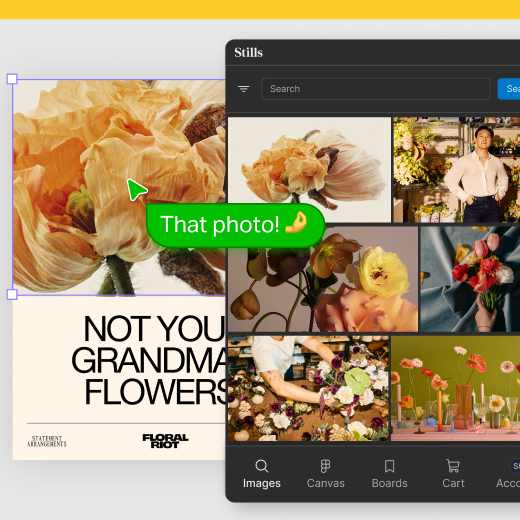
Stills, Now in Figma
This is more than a plugin; it’s an exciting new extension of your Stills workspace, bringing search, Boards, history, cart, and licensed access directly into Figma, the design environment where real creative decisions happen.
What's New
Enri Tarta — A day inside Figma's product team
“Behind products that just ‘feel good’, there is an insane amount of design and engineering that you never get to see.” Enri Tarta got rare access to Figma’s product team for a day, and the result is the kind of process tour we almost never get to see.
How to articulate
A design vocabulary guide by Emil Kowalski and Glenn Carstens-Peters. 188 terms across 12 categories — typography, color, layout, IA, accessibility, measurement — defined with the precision designers reach for when they actually know what they’re looking at. It’s a preview of a larger “design education for an era of change” arriving fall 2026.
Community profiles, redesigned
The Community profile redesign adds role, experience, tech stack, pinned work with images and links, and social channels. Combined with the FigPal customization, it reads less like a profile page and more like a creator landing page. Figma clearly wants Community to function as a discovery layer for designers, not just for resources.
WWDC
Design Principles
The refreshed HIG Design Principles, posted alongside the WWDC26 talk. Eight tenets — Purpose, Agency, Responsibility, Familiarity, Flexibility, Simplicity, Craft, Delight — each opening with a plain-language imperative (“Be clear and direct,” “Care about every detail,” “Make it human”) and expanding into sub-principles.
WWDC26: Principles of great design (Apple)
Linda Dong and Doug Williams, design evangelists at Apple, walk through the eight principles Apple now uses as its design foundation. The framing that stood out is their definition of design as “making something with intention” and the reminder that every feature asks for someone’s time, attention, and trust. This is the video companion to the refreshed HIG Design Principles page, and the first time in a while Apple has put this much weight behind articulating its design philosophy publicly.
Figma MCP Server in Xcode
Figma’s official announcement that the Dev Mode MCP Server now plugs into Xcode, alongside Cursor, VS Code, and Claude Code. The practical win, as one designer put it in the replies, is that design tokens stop getting copy-pasted into Swift and component states stop being decoded over Slack — the Figma file becomes the thing Xcode actually reads from.
AI
Getting started with custom Figma MCP skills
A skill is just a markdown file with strict instructions, optionally pointing to scripts the agent can run. Amy Lima and TJ Pitre build one live that round-trips a localhost prototype back into Figma via the use_figma tool, with per-state annotations for engineers and PMs who can’t comfortably leave feedback on a running prototype. They also cover the contribution flow to Figma’s community skills page. A good entry point if you’ve been wondering what the “skills ecosystem” around Figma’s MCP actually means in practice.
How Claude Code's lead designer builds with AI
Meaghan Choi, lead designer on Claude Code, walks through her actual daily setup at a Dive Club talk in NYC: always in a worktree so parallel Claudes don’t overwrite each other, always in auto mode so the classifier handles permission prompts, and a custom /prototype skill that spins up five HTML variants of any feature and picks one with reasoning before she even looks. She demos it by asking Claude to add autocomplete to Excalidraw with no design spec, then has it open a PR with a screenshot recorded via Claude in Chrome. Her line that lands: she doesn’t review Claude’s terminal output anymore, she reviews the PR.
Agentic design explained for designers
Christine Vallaure walks through what “agentic design” actually means once an agent is reading your Figma file instead of a developer. The key shift: all the design-system hygiene we used to wave off as optional — primitives, semantic naming, modes, slots, props, and especially the long-neglected component Description field — now becomes load-bearing, because agents read literally and never ask you over coffee what you meant. A solid 10-minute orientation before diving into the more hands-on MCP pieces.
Figma Design
Video upload limit tripled to 300 MB
Video upload cap goes from 100 MB to 300 MB across Design, FigJam, Slides, Sites, and Buzz on paid plans.
Rethinking my components with slots
Rachel from Figma’s Show Your Work series walks through her file and breaks down three categories where slots reshaped her system: repeating elements like menus and tabs (where she keeps nested subcomponents as default content so system-level edits still propagate), free-form areas like sheets and modals (where she often ships zero default content because designers just delete it anyway), and experimental page-level templates that “start to feel a lot more like code.”
Moodboard 3000 v3.0
Gavin Potenza’s image layout engine for Figma hit v3.0. Select images on canvas, pick one of four layout modes — Grid, Editorial, Masonry, or Cluster — and it composes a moodboard in one click, up to 40 images. The new release adds video support, subject-aware crops that keep faces and focal points in frame, and remixing to re-roll a composition within the same layout family.
Figma Weave
Three new ways to wire nodes
Three small connection upgrades in Figma Weave: select many nodes and connect them to one in a single move, hold Shift to fan one node out to many, or double-click a handle to spawn a prompt node already wired in.